Does GIF Compression Change Short Frame Delays?
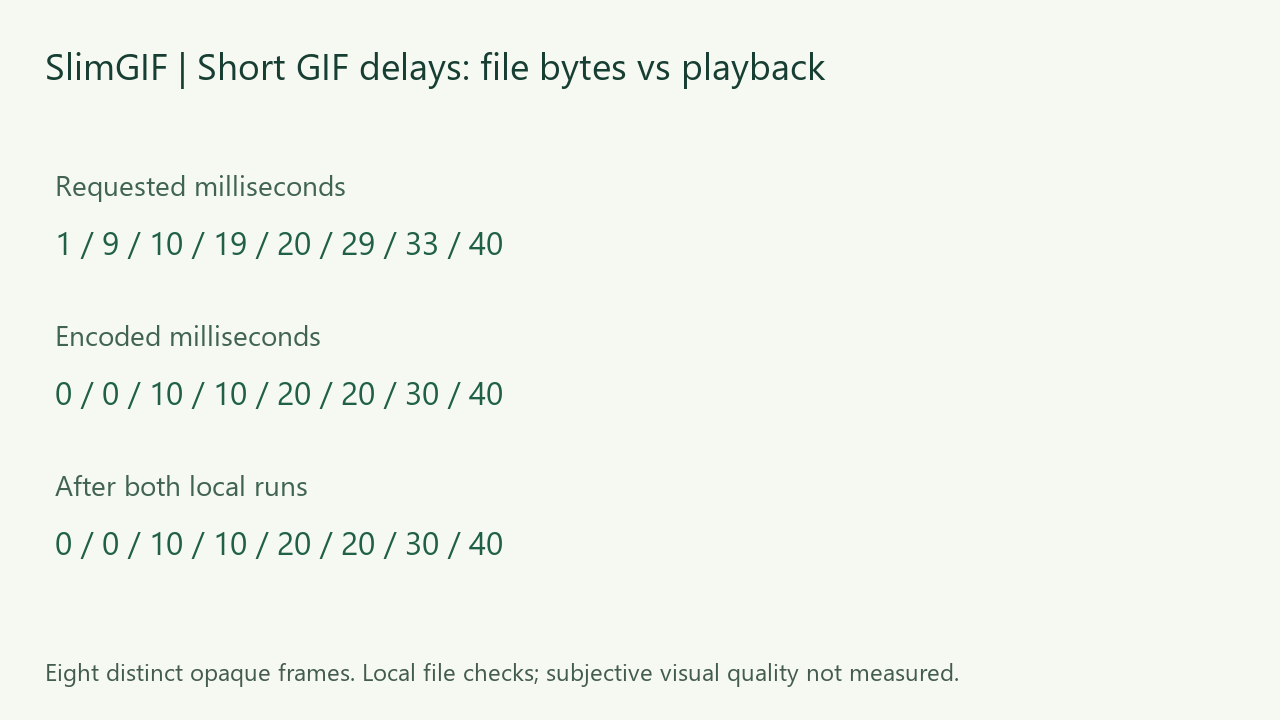
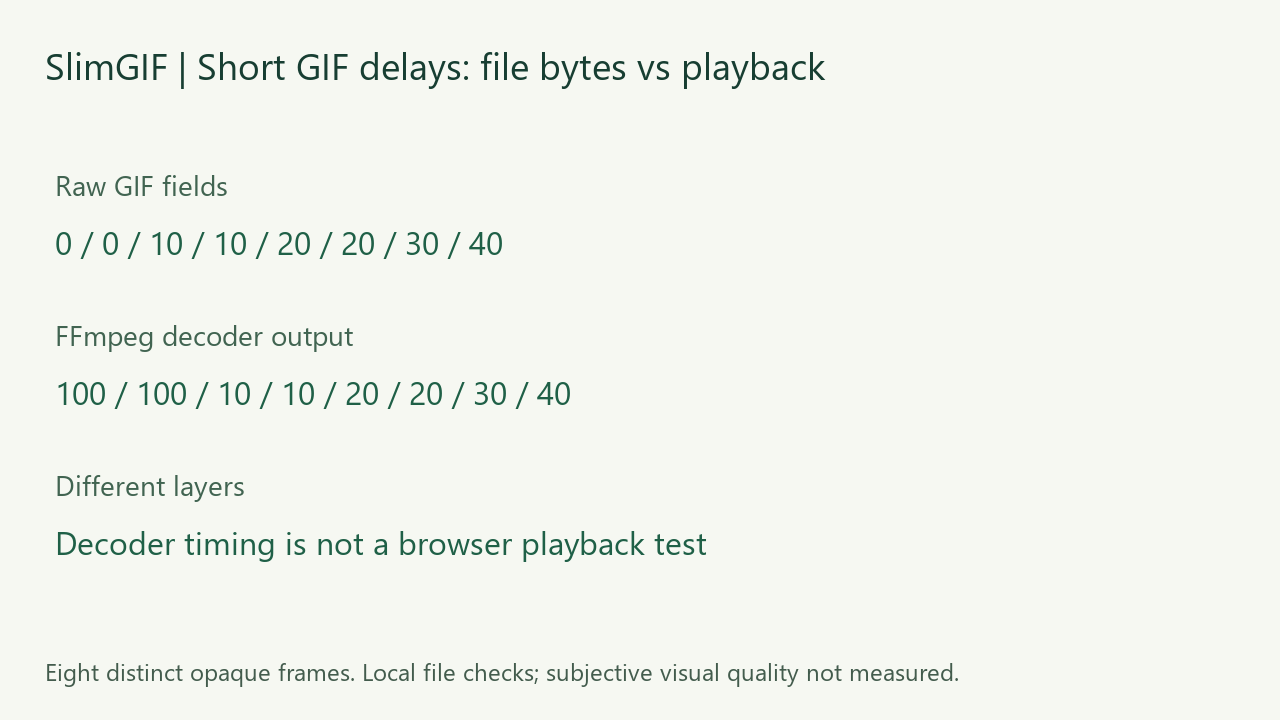
In our eight-frame test, both local compression settings kept the stored delays: 0, 0, 10, 10, 20, 20, 30 and 40 ms. The GIF shrank from 2,404 to 748 bytes. But the requests we originally passed to the encoder were 1, 9, 10, 19, 20, 29, 33 and 40 ms: the shorter precision had already been lost before compression. FFmpeg interpreted the two zero-delay frames as 100 ms each. These are local file and engine measurements, not browser playback or download observations.
Measured October 24, 2026. Own CC0 synthetic inputs, exact commands and downloadable outputs.
Which timing values did we actually measure?
| Layer | Eight values, in milliseconds | Sum |
|---|---|---|
| Pillow encoder requests | 1, 9, 10, 19, 20, 29, 33, 40 | 161 ms requested |
| Raw input GIF timing | 0, 0, 10, 10, 20, 20, 30, 40 | 130 ms stored |
| Raw compressed GIF timing | 0, 0, 10, 10, 20, 20, 30, 40 | 130 ms stored |
| FFmpeg decoded timing, input and outputs | 100, 100, 10, 10, 20, 20, 30, 40 | 330 ms decoded |
The 130 ms sum is a sum of file timing values, not a measured playback duration. Likewise, FFmpeg’s 330 ms sum is the decoder timeline we obtained on this machine, not a browser stopwatch result.
Why did 33 ms become 30 ms?
The GIF89a specification stores the Graphic Control Extension delay in hundredths of a second. One unit is 10 ms. In our Pillow 13.0.0 encoding run, 33 ms was written as three units; 19 ms as one unit; and 1 or 9 ms as zero. This is an observation of that encoder run, not a claim that every GIF editor uses the same rounding policy.
We also encoded the explicit sequence 0, 0, 10, 10, 20, 20, 30, 40 ms. Its complete input bytes matched the first file exactly. The two sequences therefore become indistinguishable to the compressor in these fixtures. Compression cannot recover the original 33 ms request from a file that stores only 30 ms.
What happened during compression?
We executed the deployed SlimGIF engine locally. The lossless-setting command was -O1 input.gif -o /out/output.gif. The default-setting command was -O1 --colors 128 --lossy=30 input.gif -o /out/output.gif. Dimensions stayed at 100%. The served engine file matched the local copy byte for byte before the test; its SHA-256 is published in the evidence record.
Both settings produced 748-byte files for the short-delay input, retaining all eight frames and their raw timing sequence. The input contained eight Graphic Control Extension blocks; these outputs contained six. The two zero-delay frames no longer had their own control blocks. Our parser records an absent frame delay as zero. Thus an unchanged timing sequence does not mean every metadata block survived byte for byte.
A separate control with all eight delays set to 20 ms began at the same 2,404 bytes and compressed to 764 bytes under both settings. Its eight control blocks remained. The 16-byte output-size gap is consistent with the two 8-byte control blocks absent from the short-delay outputs, but it does not isolate every internal encoder decision. We did not instrument optimization stages. This is not a general formula relating speed and size.
Why does FFmpeg report 100 ms for a zero-delay frame?
The raw parser and Pillow expose zero for the first two input frames. In our separate FFmpeg run, the decoded timing was 100 ms for each. The same decoder sequence appeared before and after compression. This shows why a decoded duration can differ from the field stored in the GIF; it does not prove how a current browser or messaging app handles the file.
How can I verify my own GIF?
Keep the input and saved output, then compare per-frame timing rather than just a single frames-per-second value. Pillow’s GIF documentation describes frame duration in milliseconds. Read each frame after seeking to it, and distinguish those values from player timing. In our checks, a structured GIF block parser agreed with Pillow on the raw delay sequence. FFmpeg independently decoded all eight RGBA frames; the lossless-setting output matched the input’s entire pixel sequence.
Download the files and checks
- requested: input, lossless, default
- quantized: input, lossless, default
- control: input, lossless, default


Raw/Pillow measurements and file hashes · FFmpeg timings and pixel hashes · commands · fixture and verification source · engine runner · reproduction requirements. The source scripts use our workspace paths; adjust them for another checkout. Our synthetic inputs and figures are CC0.
What remains untested?
We did not observe browser downloads or time current browsers, mobile viewers or uploaded copies. We did not score subjective visual quality or compare competitor outputs. These are simple opaque, four-color fixtures; equal output sizes under two settings do not make lossy compression universally lossless. Preserving decoded pixels in one test does not establish perceived quality for another animation.
Open the GIF compressor to test your file. For a different question, see whether changing speed reduces file size. For whole-animation repeats, see loop-count preservation; for stored-frame changes, see duplicate-frame compression.