01 / SOURCESTATIC IMAGES
Drop static images here or paste an image. New images append to the list.
All file processing stays in your browser. Your file is not uploaded.No files selected.
Checking browser support…
LOCAL FILE WORKSPACE
Drop static images here or paste an image. New images append to the list.
All file processing stays in your browser. Your file is not uploaded.No files selected.
Checking browser support…
Add static PNG, JPEG or WebP images. Arrange their order with the Up and Down buttons, set a canvas and time per image, then create an animation. Every image becomes one full-canvas GIF frame. Files remain in your browser; no login, watermark or saved history.
Each image is proportionally scaled to fit inside your chosen canvas and centered. Empty space is white. This uses contain fitting: no cropping and no stretching. Upscaling can blur detail. EXIF orientation is handled by the browser decoder; metadata and color profiles are not copied.
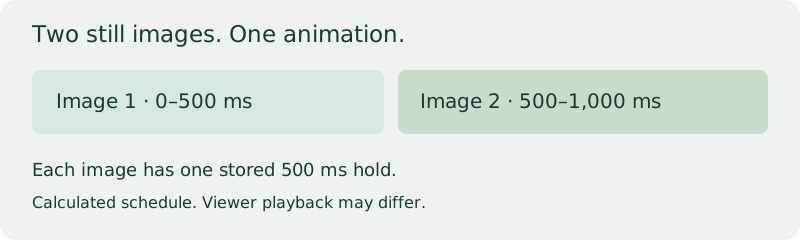
The selected delay belongs to every frame, including the last one. Total stored duration is image count multiplied by delay. The animation plan calculates the start time and end time of each image before encoding. These are stored timings, not a guarantee that every viewer plays at that speed. GIF delay is stored in 10 ms units; other values are rejected.
This uses the same local GIF writer as our other converters: a fixed 216-color RGB palette, without dithering. Photos can visibly change color. All transparency is flattened onto the white canvas on this page, including fully transparent pixels. A GIF may be larger than the source files combined. It does not add motion between photos or generate intermediate frames.
Static PNG, JPEG and WebP only. Animated inputs, including APNG and animated WebP, are rejected rather than flattened. No video, GIF input, cloud import or URL import. Up to 200 images, 4,096 pixels per canvas side and 100 million total canvas pixels. Usable file size depends on browser memory; encoding stops after two minutes. ImageDecoder, workers and OffscreenCanvas are required. Unsupported browsers show an error.
Before download, the generated GIF is parsed and decoded again. Frame count, dimensions, all stored delays and the selected loop instruction must match. This does not mean that source photo colors survive palette quantization.
Inputs: one real product photo supplied by the site operator and fade-rgba-fs8.png publicly uploaded by olt in Pillow issue 1838. Source images and the animation are not published here. The photo is a real-scene sample, not vector art or a built-in tool sample.
| Input bytes combined | GIF bytes | Canvas | Frames / delay | Local time |
|---|---|---|---|---|
| 175,422 | 26,034 | 512 × 512 | 2 / 500 ms each | 0.365 s |
These are readings from one local Chrome run, not averages. The downloaded file was independently parsed with Pillow: two frames, 512 × 512, palette mode P, 500 ms each and infinite loop field 0. Reordering the images and choosing one play produced 26,015 bytes in a separate 0.438 s run; independently decoded frames matched the original run in reversed order, with no loop extension. Results depend on files, settings and device; smaller output and preserved photo colors are not promised.
Yes. Choose multiple static photos. Each photo is one frame; the tool does not animate objects inside a photo.
They fit proportionally inside one canvas with white margins. No image is cropped or stretched.
Use Convert PNG to GIF to keep its original dimensions and fully transparent pixels.
Use Reduce GIF size or Resize GIF. Smaller output is not guaranteed.
Cloudflare Web Analytics measures website use. Source images are not sent to analytics. See our privacy policy.