01 / SOURCELOCAL FILE
Drop one GIF here or paste a GIF file.
All file processing stays in your browser. Your GIF is not uploaded.No file selected.
Choose a GIF, set its orientation, then download.
Drop one GIF here or paste a GIF file.
All file processing stays in your browser. Your GIF is not uploaded.No file selected.
Choose a GIF, set its orientation, then download.
Choose, drop or paste one GIF. Select a quarter turn, a half turn or no rotation. Add a horizontal flip to mirror GIF frames, or a vertical flip to turn them upside down. Preview the generated animation before downloading. All file processing stays in your browser; your file is not uploaded. No registration, watermark or saved history.
Rotation and mirroring do not commute: changing their order can change the picture. This tool always rotates the original first, then applies flips in the rotated canvas. Horizontal means left and right in the output; vertical means top and bottom in the output. Choosing both flips is equivalent to a half turn after the selected rotation. Each operation starts from your original file, so repeated clicks do not accumulate transformations.
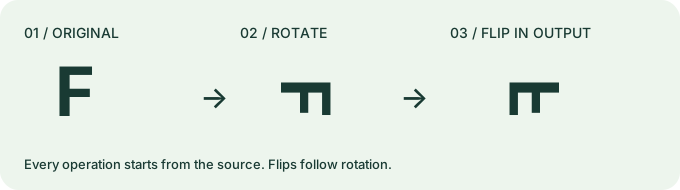
For a source pixel at (x, y), a clockwise quarter turn maps it to (H − 1 − y, x) on an H × W canvas. A horizontal flip then maps output x to output width − 1 − x. These are calculated coordinate rules, not measured compression results.
Gifsicle WebAssembly expands dependent frames, applies right-angle transformations and writes GIF again in a browser worker. Frame order, each stored delay and the recorded loop field stay unchanged. The width and height swap for quarter turns; a half turn or flip keeps them. No resizing, frame removal, lossy option or palette reduction is requested. Stored timing and expected dimensions are checked before download is enabled.
Right-angle turns rearrange the pixel grid without interpolation. Encoding and frame rectangles can change, so bytes may increase. Comments and application metadata are not promised identical. Short and zero stored delays may play differently between viewers. Rotation does not fix a discontinuous loop.
One GIF87a or GIF89a file, static or animated. Only 90°, 180° and 270° rotation, horizontal and vertical flips are supported. Arbitrary angles, APNG, WebP, videos, batches and URL imports are not supported. There is no fixed input-byte limit; available browser memory determines practical capacity. Files above 100 million frame pixels (width × height × frame count) are rejected. Each worker has a two-minute timeout; a rotation plus flip can use two workers in sequence.
The interface and engine load from this site. Conversion needs no server upload. Website statistics use Cloudflare Web Analytics; file content is not sent to analytics.
Public user attachment: user-voltron.gif from gifuct-js issue 65, not a built-in sample. One local browser run, October 12, 2026. These readings are not averages or promises for other files or devices.
| Setting | Input bytes | Output bytes | Output pixels | Processing |
|---|---|---|---|---|
| 90° clockwise, no flips | 2,617,259 | 3,325,001 | 166 × 224 | 1.71 s |
Input: 224 × 166 pixels, 181 frames, stored duration 10,820 ms and loop field 0 (infinite). Downloaded output: 181 frames, the same per-frame delay sequence and loop field. Independent Pillow decoding matched every displayed RGBA frame to the expected clockwise transform. No compression or palette-reduction option was selected. The larger output is delivered as generated.
No. Flipping changes the picture's spatial orientation. Reversing changes the time order. Use Reverse GIF playback for backwards motion.
Choose No rotation and Flip horizontally. The source frame order stays unchanged.
Not necessarily. The result can be larger. Use Reduce GIF size next if bytes matter.
Use Resize GIF dimensions or Crop GIF edges.