01 / SOURCEONE FILE
Drop one GIF here, or paste a GIF file.
Animated or static GIF · local processingChoose a file to begin. No upload, login or watermark.
Match a background color. No model download or server upload.
Drop one GIF here, or paste a GIF file.
Animated or static GIF · local processingChoose a file to begin. No upload, login or watermark.
Match a background color. No model download or server upload.
Field note · October 16, 2026
Color matching cannot tell background from foreground. If a light part of your subject is similar to the background and connected to it, raising tolerance can remove that part too. A smaller output is not evidence of a better cutout.
We ran the same public animation from gifuct-js issue 65 twice in the desktop browser on October 16, 2026. The input was 2,617,259 bytes, 181 frames and 224 × 166 pixels. Both runs used color #d3d2d6, border-connected removal on, edge cleanup 0 and transparent output. Only tolerance changed.
| Tolerance | Output bytes | Elapsed | Transparent pixels in first frame |
|---|---|---|---|
| 12% | 1,474,499 | 4.212 s | 14,173 |
| 50% | 1,191,302 | 4.330 s | 19,913 |
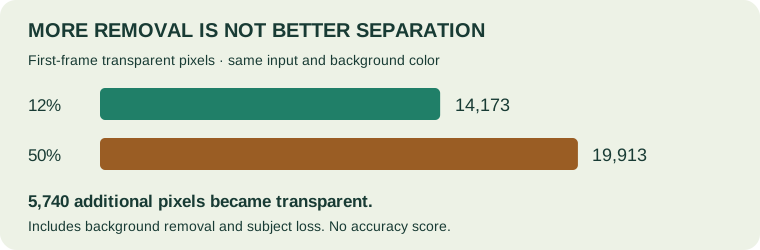
The higher-tolerance result erased visible light-colored subject details on inspection. Its first frame had 5,740 additional transparent pixels. This count is calculated as 19,913 minus 14,173; it includes any additional background removal as well as subject loss. We did not create a manually labelled foreground mask, so no accuracy percentage is claimed.
Both downloaded outputs were independently decoded with Pillow: all 181 frames, the first 180 stored delays of 60 ms and the last delay of 20 ms, loop field 0, and 224 × 166 pixels matched the input. Correct animation metadata does not establish correct subject separation. Each time above is one run, not an average or a speed promise. The original October 15 measurement below is retained separately.
Lower tolerance first and keep edge cleanup at 0 while checking the result. Border-connected removal can protect an enclosed patch of matching color, but it cannot protect a patch connected to the outside through other matching pixels. If foreground and background share those colors, this color-based method may not separate them.
Border-connected removal only reaches matching pixels connected to the frame edge. Turning it off also removes matching colors in enclosed areas, including matching parts of the subject. Compare the result before keeping that setting.
Try a small tolerance adjustment, then inspect fine details before increasing edge cleanup. Cleanup removes pixels from the retained mask; it does not recover hair or create soft transparency. GIF edges are either transparent or opaque.
A scene with many different colors, shadows or foreground colors repeated in the background may not have one usable background color. Increasing tolerance until the scene disappears can erase the subject. This version does not include AI subject detection or a manual restore brush; use a different editing method when color matching cannot separate the regions.
Yes. Removing a color does not guarantee smaller bytes. After checking the cutout, reduce GIF size if the file is too large, or convert GIF to APNG or WebP when the destination supports those formats. Format conversion does not recreate soft edge detail that the source GIF never contained.
This color-based GIF background remover matches one RGB color with a tolerance for similar colors. It does not recognize people or objects and cannot automatically separate a subject from a complex photo background. Border-connected removal protects matching colors enclosed inside the subject, but can miss backgrounds separated from the border. Edge cleanup erodes the retained mask and can remove fine details. The same settings apply to every frame.
GIF frames are decoded as full displayed canvases, including earlier-frame changes and disposal instructions. Every frame is processed and written in its original order at its original dimensions. Stored delays and the original GIF loop field are retained. Full-canvas output uses disposal to clear between frames rather than stacking transparent cutouts. No frames are deliberately dropped. A zero stored delay remains zero; browser playback can clamp short delays.
GIF has binary transparency, not soft alpha. This version uses a fixed 216-color RGB palette plus a transparent index, without dithering. Photo colors can change. A solid replacement background removes transparency. The result can be larger than the input. There is no lossless, perfect-edge, smaller-file or no-flicker promise.
One local GIF at a time, when the browser supports ImageDecoder for GIF. A static GIF produces one frame. Other input formats are not supported on this page. No URL import, cloud import, video import, camera recording, multi-file batch, manual erase or restore brush, stickers, HEIC, MNG or JPEG XL support.
Safety limits: 50 MiB per file, 200 frames, 4,096 pixels per side and 100 million frame pixels. A five-minute processing timeout cancels the worker. Required browser features are ImageDecoder, OffscreenCanvas, and workers; clipboard image copying depends on browser permission and support.
Yes. This GIF background remover reads your selected file locally and matches background colors on your device. No inference API receives your image and no AI model is loaded.
Select the color to remove, adjust tolerance and inspect the generated animation. Use border-connected removal if the same color appears inside the subject.
No. Manual painting is not included. Adjust color tolerance or edge cleanup, or use another method if the result loses important detail.
Tested on October 15, 2026: 181 frames, 224 × 166 pixels. Color #d3d2d6, tolerance 12%, border-connected removal on, edge cleanup 0, transparent output.
| Input bytes | Output bytes | Elapsed |
|---|---|---|
| 2,617,259 | 1,474,499 | 9.163 seconds |
A single desktop run, not an average or a smaller-file promise. Downloaded output was independently parsed: 181 frames, stored delays of 60 ms for the first 180 frames and 20 ms for the last, loop field 0 (infinite), and 224 × 166 dimensions matched. Your file and device may behave differently.
Does a compressed transparent GIF show a pale rim? Compare our opaque-edge fixture on white and dark backgrounds.